i use the text tool/blending options in photoshop!!
so after you type in your text and change the colours (i think the standard is either white or yellow), rasterize your layer (in your layers panel, right click the text layer > rasterize layer)
[[EDIT: ive been told you don’t actually have to rasterize the layer to apply blending options!! which is pretty dang neat!!]]
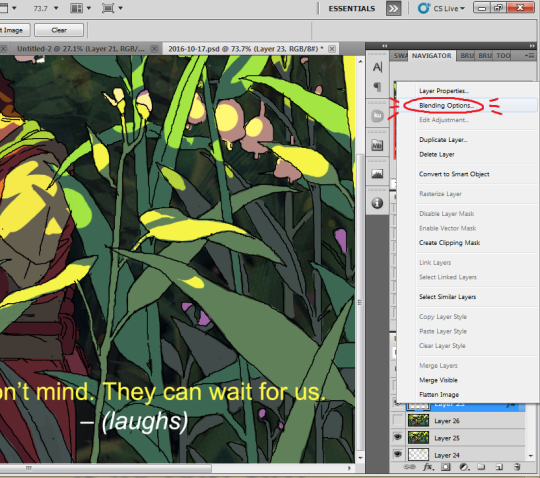
after rasterizing, right click your layer again > blending options:
It’ll open up a ‘blending options: default’ window.. For your text, the option you want is ‘stroke’, at the bottom of the checklist on the left, so click that:
and it should bring you to a window where you can change the width and opacity of the stroke effect around your text! I usually bring it down to 4 or 5 px, but whatever you think looks best should work too (you can also change colour and opacity; i’ve just got it set to black at 100% opacity.)




 Inspiration Haven